Why You Need a Cheap Ethernet Cable Tester
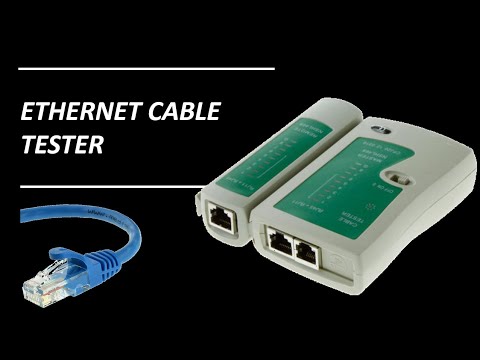
Ethernet Cable Tester. Whether you are crimping your own RJ45 connectors or just trying to figure out why your internet is dropping out in the home office, there is one tool that saves hours of frustration: the Ethernet Cable Tester.
In this guide, I’m looking at a budget-friendly unit I picked up for a few pounds £££. It’s a simple “clone” device often found on eBay or Amazon, but as I’ve found while wiring up my home network, it’s an absolute bargain that does the job perfectly.
Watch the Full Video of the Best Cheap Ethernet Cable Tester (My Top Pick)
What Does an Ethernet Cable Tester Do?
At its core, this tool tests two critical things:
- Continuity: It ensures there are no physical breaks in any of the eight small copper wires inside your Ethernet cable.
- Termination Order: It verifies that the wires are in the correct order at both ends (e.g., ensuring you haven’t accidentally crossed a wire when crimping an RJ45 plug).

Key Features of This Budget Unit
Despite the low price point, this tester is surprisingly versatile:
- Dual-End Testing: The unit slides apart into two pieces. You can plug the master unit into a wall socket in one room and take the remote unit to another room to test long cable runs through walls.
- RJ45 & RJ11 Support: While mostly used for Ethernet (RJ45), it also features ports for testing telephone cables (RJ11).
- LED Indicators: It features 8 numbered LEDs (plus a ‘G’ for ground) that light up in sequence to show you exactly which wire is working—or which one is failing.
- 9V Battery Powered: It runs on a standard 9V battery, making it completely portable for working in lofts or crawl spaces.
How to Test Your Cables (Step-by-Step)
Testing a patch lead or a long run is straightforward:
- Plug in the Cable: Insert one end of your RJ45 cable into the master unit and the other into the remote unit.
- Switch it On: The unit will begin cycling through the numbers 1 to 8.
- Watch the Lights: You are looking for parallel green lights . If the master unit flashes ‘3’ and the remote unit also flashes ‘3’, that wire is healthy.
- Identify Failures: If a light doesn’t skip a beat on one side, you have a break. If the lights flash out of sequence (e.g., 1-2-4-3), you’ve crossed your wires during termination.
Why Every DIYer Needs One
If you are building a local area network (LAN), this tool is essential. I’ve used mine extensively while putting networking around the house. For a small cost, it eliminates the guesswork and tells you immediately if your hardware is the problem or if it’s just a bad cable.
Watch the full video for how to use an Ethernet Cable Tester
Pro Tip Make sure you take a look at ethernet cable standards guide to see how fast your ethernet cables can carry data. Or, look at our recommended Internet Speed Tester to see how fast your network is performing.
Subscribe Now!
If you found this Ethernet Cable Tester guide helpful and are ready to stop guessing and start troubleshooting your own tech plus smart DIY, head over to the Built By Pete YouTube channel! We’ve got hundreds of other DIY projects and smart home tutorials. Click here to subscribe and hit the notification bell so you never miss out on the tips, tricks, and step-by-step guides that will simplify your tech life.