Ethernet Cable Standards Explained: Cat5e vs. Cat6 vs. Cat8 (The Definitive Home Network Guide)
Ethernet Cable Standards. If you’ve ever bought an Ethernet cable, you’ve been bombarded with acronyms: Cat5e, Cat6, Cat6a, UTP, STP. It’s frustrating to know what your router needs to deliver on its promise of high-speed gigabit internet.
This guide will demystify the chaos of Ethernet cable standards. We’ll show you the exact performance differences between each “Category” (Cat), explain the confusing world of shielding, and give you the definitive answer on which cable you need for a fast, future-proof home network.
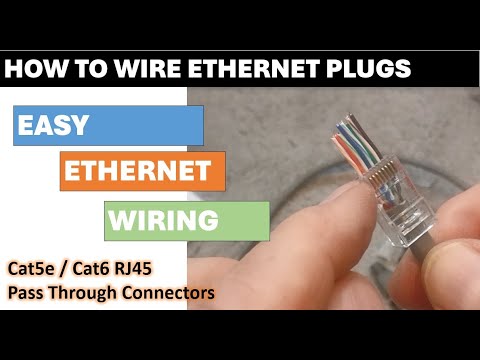
Pro Tip: Learn how to wire ethernet connectors yourself. Take a look at our video guide for wiring ethernet connectors the easy way.
1. The Cable Categories: Speed vs. Bandwidth
Ethernet cables are classified by “Category” (Cat), which dictates their maximum supported data speed and the frequency (bandwidth) they can operate at. Bandwidth (MHz) is like the width of the data pipeline, and Speed (Gbps) is how fast the data travels.
Ethernet Cable Performance Comparison
| Category | Max Speed (Typical) | Max Bandwidth (MHz) | Max 10 Gbps Distance | The Built By Pete Take |
| Cat5e | 1 Gbps | 100 MHz | N/A | Baseline: Perfect for basic internet, older devices, and budget runs. |
| Cat6 | 1 Gbps (10 Gbps up to 55m) | 250 MHz | 55 meters | The Sweet Spot: Ideal for most homes and gaming setups. |
| Cat6a | 10 Gbps | 500 MHz | 100 meters | Future Proof: Necessary for professional use or full 10 Gbps throughout a large building. |
| Cat7 | 10 Gbps | 600 MHz | 100 meters | Niche: Technically superior to Cat6a but not a TIA standard. Often uses non-standard connectors. |
| Cat8 | 25/40 Gbps | 2000 MHz | 30 meters | Data Center Only: Extreme short-distance speed for connecting racks. |
Key Insight: Notice the difference between Cat6 and Cat6a. Cat6 supports 10 Gbps, but only over runs up to 55 meters (180 ft). If you need that speed across a large house, you must step up to Cat6a for the full 100-meter range.

2. Shielding Explained: UTP vs. STP
The second major difference in ethernet cable standards is shielding. This protection determines how resistant your cable is to electrical interference (noise) from other wires, power outlets, or appliances.
UTP (Unshielded Twisted Pair)
- What it is: The most common type. The wires are twisted to help cancel out interference, but there is no foil or metal braid around the internal wires.
- Best For: Residential use, typical home office environments, and short runs where interference is minimal.
- Pros: Cheaper, more flexible, and easier to install.
STP (Shielded Twisted Pair)
- What it is: The internal twisted pairs are protected by a layer of foil (FTP) or a metal braid/foil (S/FTP, S/STP) before the outer jacket. This acts like a metal cage to block external electronic noise.
- Acronym Tip: Look for the F (Foil) or S (Braided Shield/Screen) in the code (e.g., F/UTP or S/FTP).
- Best For: Industrial settings, data centers, running cables near high-power electrical lines, or installations with very long runs.
- Pros: Better signal integrity, reduces crosstalk, and necessary for top-tier Cat7/Cat8 performance.
- Con: More expensive, thicker, and requires a properly grounded connection to work correctly (or it can attract noise!).
3. The Built By Pete Recommendation
For the average home or small office, your choice should be dictated by your goal:
- For Basic Gigabit Speed (1 Gbps):
- Cat5e UTP. It is the cheapest and most flexible solution, and it handles the standard 1 Gbps speeds over the full 100 meters.
- For Future-Proofing & Gaming (10 Gbps over short distances):
- Cat6 UTP. This is the modern sweet spot. It’s often only slightly more expensive than Cat5e but gives you 10 Gbps capability for runs under 55 meters—perfect for connecting a PC to a local switch.
- For Whole-Home 10 Gbps Wiring:
- Cat6a. This is the minimum standard required to guarantee a 10 Gbps signal over the full 100 meters of a structured wiring run.
The Ultimate Mistake: Using an old, slow Cat5 cable in a critical link (like to your main router). Your entire network speed will bottleneck down to the lowest cable in the chain. Always upgrade your key connections!
Wire Your Own Ethernet Connectors
Learn how to wire ethernet connectors yourself. Take a look at our video guide for wiring ethernet connectors the easy way.
Subscribe Now!
If you found this Ethernet Cable Standards Explained guide helpful and are ready to stop guessing and start troubleshooting your own tech plus smart DIY, head over to the Built By Pete YouTube channel! We’ve got hundreds of other DIY projects and smart home tutorials. Click here to subscribe to the BuiltByPete youtube channel and hit the notification bell so you never miss out on the tips, tricks, and step-by-step guides that will simplify your tech life.